


When we think about cyber attacks, we usually picture a stolen laptop, a phishing email or a hacked phone. This month, a run of attacks across Europe showed something quite different. The target was the supermarket fridge.
What happened
In October, police in France said hackers had taken control of refrigeration units at hundreds of supermarkets, causing fires and spoiled stock, as reported by CNBC.
Then, in the early hours of Monday 2 November, it happened again on a wider scale. Supermarkets in Belgium, Sweden, Ireland, the Netherlands, Luxembourg and Estonia found their fridges and freezers had been remotely switched into defrost mode. Ahold Delhaize, Colruyt, Carrefour, ICA, Coop and Musgrave (which runs SuperValu in Ireland) all reported stores affected, according to NBC News and Reuters. One Swedish store said its freezers had reached 50°C. A Belgian butcher estimated around €15,000 of meat was lost.
Nobody has claimed responsibility, and no ransom has been demanded. Researchers have suggested that the lack of any financial demand points to sabotage rather than money.
Why would anyone hack a fridge?
A modern supermarket fridge isn’t just a cold box. It’s run by a small computer, called a controller, that manages temperature, defrost cycles and alarms. Many of these controllers can be managed remotely, so engineers can keep an eye on them without visiting the store.
That convenience is also the weak spot. If a controller can be reached over the internet and hasn’t been updated, it can become a way in. The head of Sweden’s national cyber security centre said many exposed devices like these need updates or patches.
This kind of equipment is often called operational technology: the kit that runs the physical side of a business. It tends to be installed once and then left alone for years, because it does its job and nobody wants to touch something that works.
It’s not just supermarkets
You probably don’t run a chain of supermarkets, but you almost certainly have connected kit that nobody thinks of as “IT”:
- Heating, air conditioning and building management systems
- Door entry and access control
- CCTV cameras and recorders
- Printers and multifunction devices
- Card machines and tills
- Smart TVs and meeting room screens
Each of these is a small computer with its own software, and that software has flaws that get found and fixed over time. Updates only help if someone actually installs them.
AI is making the problem bigger
Something else has changed in 2026. AI tools have become very good at finding flaws in software.
In October 2025, 4,389 new software vulnerabilities were published to the US National Vulnerability Database. In October 2026, it was 17,481. That’s four times as many in a single year.
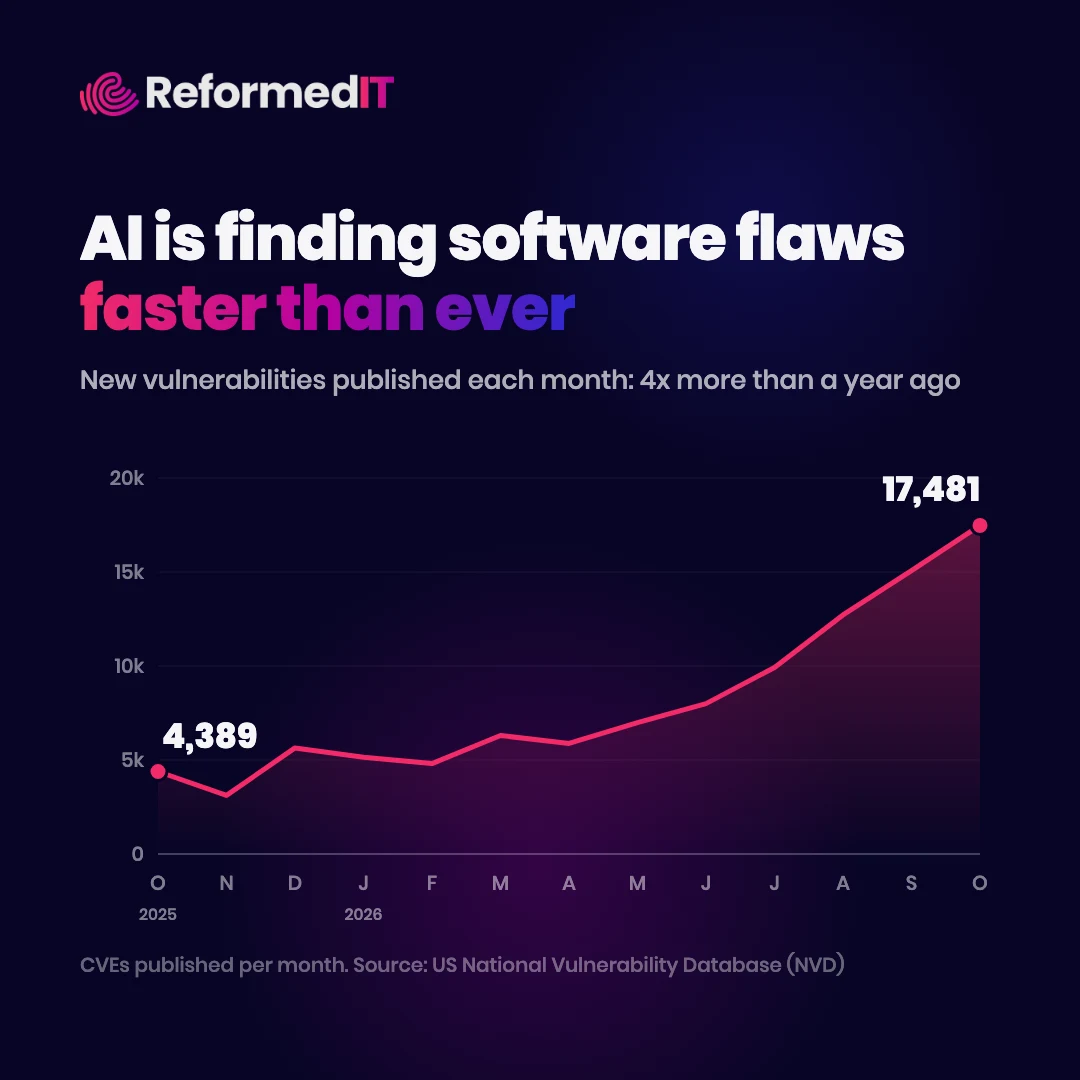
IBM X-Force found that publicly disclosed vulnerabilities across Microsoft, Oracle, Google Chrome and Apache rose from about 1,500 between January and September 2025 to more than 10,000 in the same period this year. FIRST, the body that tracks these numbers globally, now expects around 66,000 for the whole of 2026, and points to AI bug-hunting tools as a major reason, according to Help Net Security.
On its own, that’s good news. More flaws found means more flaws fixed. The trouble is that once a flaw is published, attackers can read about it too. After the latest attacks, Belgium’s national cyber security centre warned that AI can help attackers exploit weaknesses.
The time between a fix being released and a fix being installed has always mattered. With this many flaws being found, it matters more than ever, and forgotten devices are where that gap stays open the longest.
What you can do
You don’t need to be a cyber security expert to make a real difference. Start here:
- Make a list. Write down everything in your building that connects to your network or the internet, not just computers and phones.
- Ask who updates it. For each item, find out whether it gets updates and who installs them. If the answer is “the supplier, probably”, ask the supplier.
- Change default passwords. Many devices ship with a default login that’s printed in the manual for anyone to find.
- Keep it off the open internet. Equipment that needs remote access should sit behind a secure connection, not be directly reachable from the internet.
- Separate it. Put building and operational kit on its own network, away from the computers that hold your data.
- Retire what can’t be updated. If a device no longer gets security updates, plan to replace it.
The takeaway
The supermarket attacks didn’t need a clever trick. They needed connected equipment that had been left alone. As AI speeds up how quickly flaws are found, “set it and forget it” is no longer a safe approach for anything with a network cable.